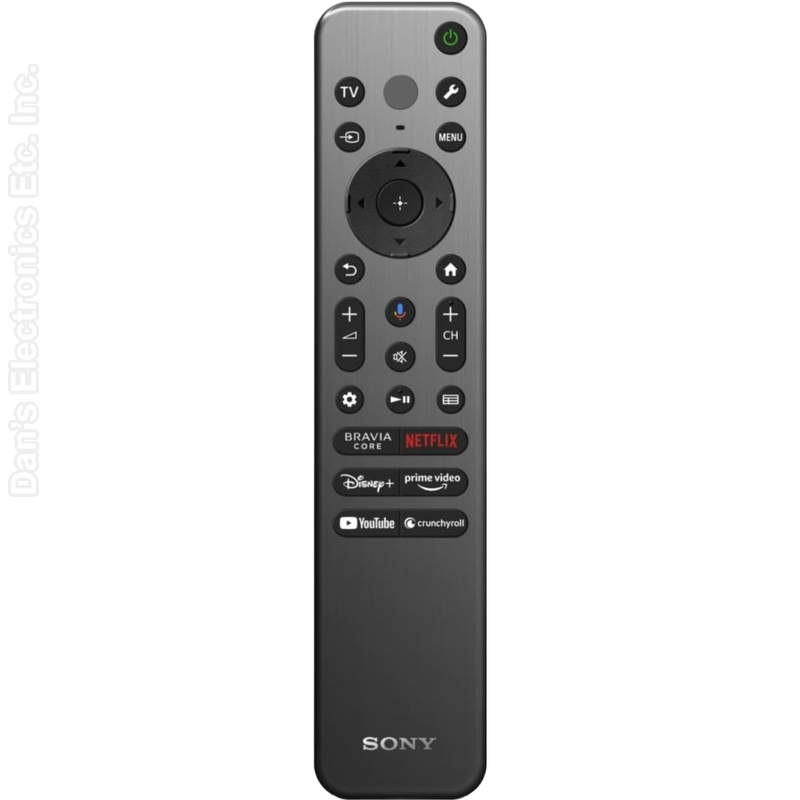
An upgrade over your original remote. This is Sony's newer 2023 voice remote, with Google Assistant voice control and a refreshed design. On Sony TVs made before 2023, the TV may offer a software update for the remote each time it's turned on. The remote doesn't need it, so just choose Later or Cancel. Everything keeps working, including voice, power, volume and every button. It's a quick tap for a newer, better remote.
The Sony RMF-TX910U is a radio frequency (RF) voice remote for compatible Sony Google TV / BRAVIA TVs. Pairing is required for voice and Bluetooth features.
Specifications
- Remote: Sony RMF-TX910U (1-016-949-21; also 1-016-949-23)
- Radio frequency (RF) / Bluetooth voice remote; pairing is required
- Backlit keys and a find-remote buzzer
- Batteries: 2 AAA (not included)
Good to Know
- Sony TVs made before 2023 may ask to update this remote when turned on. The update isn't needed, so just tap Later and enjoy the newer 2023 remote with all features working.
- This remote has backlit keys. To turn the backlight off or on, press and hold Volume (-) and HOME together for 2 seconds; the microphone LED blinks twice.
- This remote has a find-remote buzzer.
- Voice search needs an internet connection, and the TV must be set up as Google TV.
- Takes 2 AAA alkaline batteries (not included). Rechargeable batteries cannot be used.
Setup / Pairing
- Insert 2 AAA batteries (not included), matching the polarity marks, then close the battery cover.
- Press the Power button to turn on the TV.
- Press and hold the VOL(-) button and the Google Assistant (Mic) button together for 2 seconds to start pairing. Pairing happens automatically; no further setup is required.
- To pair or re-pair from the TV menus: press HOME or Quick Settings, then go to Settings > Remotes & Accessories > Remote control > Connect via Bluetooth (or Connect a new remote / Activate button) and follow the on-screen instructions. On some menus, press and hold VOL(-) and the Mic button for 3 seconds until the TV shows Connecting..., then select OK when it says the new remote has been connected.
- If pairing fails, replace the batteries with new alkaline AAA batteries and try again. Rechargeable batteries cannot be used in this remote.
- After pairing, press and hold the Google Assistant (Mic) button and speak into the microphone at the top of the remote. An internet connection is required, and the TV must be set up as Google TV (not as a basic TV). If you have a Voice control setting, turn it On under Accounts and Sign In > Google Assistant > Voice control.
- See the User Guide for full instructions.
What's in the Box
- 1 Sony RMF-TX910U remote
- Batteries not included
Compatible Models
- Sony RMF-TX910U
- 1-016-949-21
- 1-016-949-23
- Sony TVs such as XR55A95L, XR65A95L, XR75X93CL, XR85X90CL, XR85X93CL, XR65X90CL, XR65X93CL, XR55X90CL and others listed on this page.
Before ordering, check the model or part number printed on your old remote (usually on the back or inside the battery compartment) and compare the photos and button layout to your current remote. If you are not sure, contact us with your model or a photo of the original remote.
Guaranteed Compatible Universal
: Anderic RRU401, Use code:
2660, 2679, 2765,2575... (
click here for programming instructions)
Dimensions: 2.00 x 6.00 x 1.00 (W x L x D, inches)