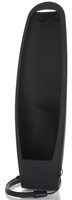
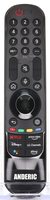
This is the LG AN-MR18BA remote that came with LG EU TVs. It is a voice remote. It works with LG TVs such as 43UK3600MLB, 43UK6200PLA and 43UK6300MLB.
Specifications
- Radio frequency (RF)
- Batteries: 2 AA (not included)
Good to Know
We may ship the newest model of this remote.
Setup / Pairing
To register, point the remote at the powered-on TV and press WHEEL (OK). To reset, hold HOME+BACK for five seconds to unpair, then point at the TV and press WHEEL (OK) to register again.
- Insert the batteries, turn on the TV and wait about 20 seconds.
- Point the remote at the TV and press the Wheel (OK) button. The TV shows a message when the remote is registered.
- If it does not register, turn the TV off and on again and repeat. To unregister the remote, press and hold Home and Back together for 5 seconds.
Troubleshooting
- If the Magic Remote fails to register, turn the TV off and on again, then try again.
- If the pointer does not appear, hold HOME and BACK together for five seconds to unpair, then point at the powered-on TV and press WHEEL (OK) to register.
What's in the Box
- 1 LG AN-MR18BA remote
- Batteries not included
Compatible Models
- LG AN-MR18BA
- Works with many LG TVs, including models starting with OLED55, OLED65, 65SM and 55SK.
Before ordering, check the model or part number printed on your old remote (usually on the back or inside the battery compartment) and compare it to the full compatible models list.
Battery Required : AA Battery 2 pack
Dimensions: 2.00 x 6.00 x 1.00 (W x L x D, inches)