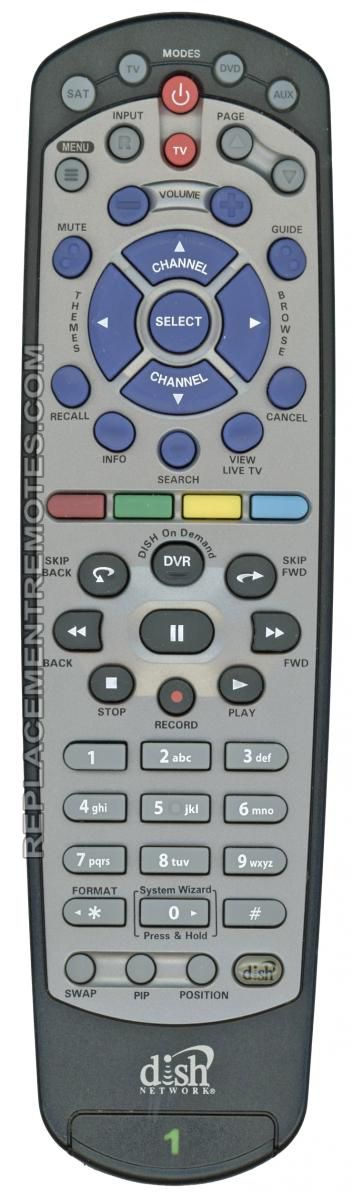
The Dish Network 20.0 (158926) is an infrared remote for Dish receivers that controls up to four devices.
Specifications
Infrared (IR); point it at the device
Batteries: 4 AAA (not included)
Good to Know
Infrared only: point it at the receiver.
Other devices need to be programmed to the remote.
Setup / Pairing
Turning on the remote
Remove the PULL tab on the back of the remote.
Press SYSTEM INFO on your DISH receiver (on some receivers it is behind a front door).
Press SAT and then RECORD on the remote.
Select Done on the screen.
Pairing the remote with your TV or other device
Press and hold the device button you want to program (TV, or DVD/AUX for another device) until all four device buttons light up.
While they are lit, enter the three-digit code for your device from the Device Codes list in the DISH Quick Start Guide.
Press #. The device button flashes three times.
Press the device power button; your device turns on or off. Stay within ten feet and point the remote at the device. If it does not respond, start again with a different code for your device's brand.
What's in the Box
1 Dish-Network 20.0 IR Satellite remote
Batteries not included
Compatible Models
Works with many Dish-Network set-top boxes, including models such as 201, 211, 222 and 2700.
Before ordering, check the model or part number printed on your old remote (usually on the back or inside the battery compartment) and compare it to the full compatible models list.
Specifications
Model: 20.0 Part Number: 158926 Catalogue No.: 79526
Battery Required : AAA Batteries 4 Pack Dimensions: 2.00 x 6.00 x 1.00 (W x L x D, inches)
Customer Reviews
1 review
by nancy on July 26, 2016
Thank you for offering this remote
I got it within a few days. Very fast