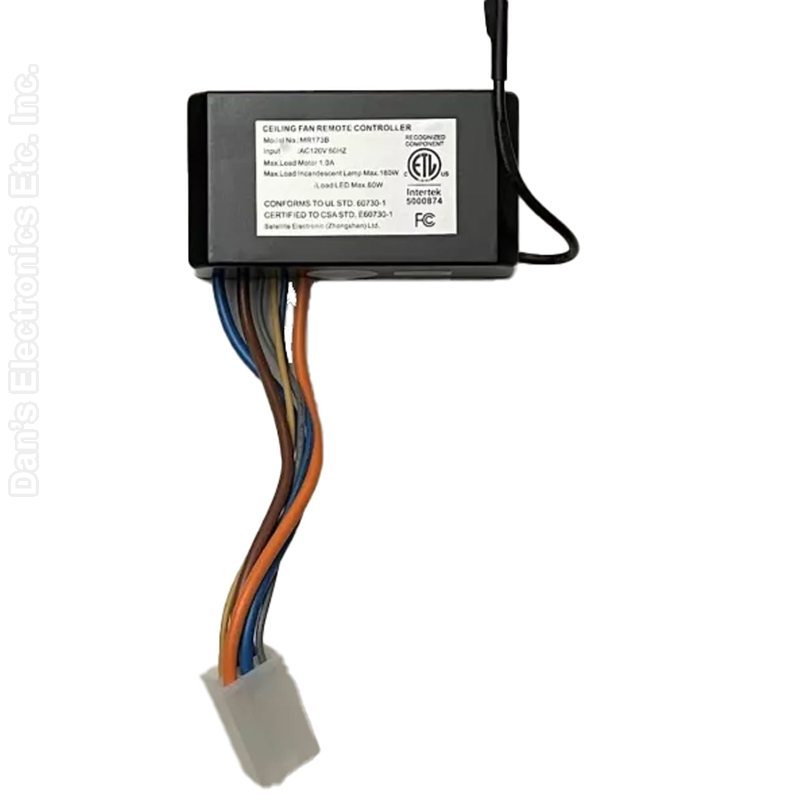
The Anderic MR173B is a plug-in replacement ceiling fan receiver for Harbor Breeze Boltz and Boltz II ceiling fans.
Specifications
- Shipped receiver: Anderic MR173B
- Radio frequency (RF) receiver
Good to Know
- It does not include a remote control.
- Only one remote can be paired to these fans.
Setup / Pairing
Installation and pairing
- Turn off power to the fan at the circuit breaker.
- Open the fan housing and unplug the existing receiver.
- Plug in the new receiver and close the fan housing securely.
- Restore power and, within 30 seconds, press the LEARN key inside the remote's battery compartment. When pairing succeeds, the fan turns on at low speed with the light off.
Safety: turn off power at the circuit breaker before opening the fan canopy or touching the receiver.
Setup / Pairing
Works with the Anderic RRTX00I and Harbor Breeze A25-TX00I, TR258A, TR258B, KUJCE10512 and KUJCE10176 remotes.
Installation
- Power off the fan at the breaker.
- Open the fan housing.
- Unplug the existing receiver.
- Plug in the MR173B.
- Securely close the fan housing.
- Return power to the fan.
Pairing the remote (RRTX00I guide)
- Turn the fan's power off with a wall switch or circuit breaker.
- Return power to the fan, and within 30 seconds press the LEARN key inside the remote's battery compartment. The indicator light flashes.
- If paired successfully, the fan turns on at low speed and the light is off.
What's in the Box
- 1 Anderic MR173B receiver
Compatible Models
- Harbor Breeze Boltz and Boltz II ceiling fans with A25-TX00I, TR258A, TR258B, KUJCE10512, KUJCE10176 or RRTX00I remotes
Before ordering, check the model or part number printed on your old remote (usually on the back or inside the battery compartment) and compare it to this list.
Dimensions: 4.00 x 4.00 x 3.00 (W x L x D, inches)