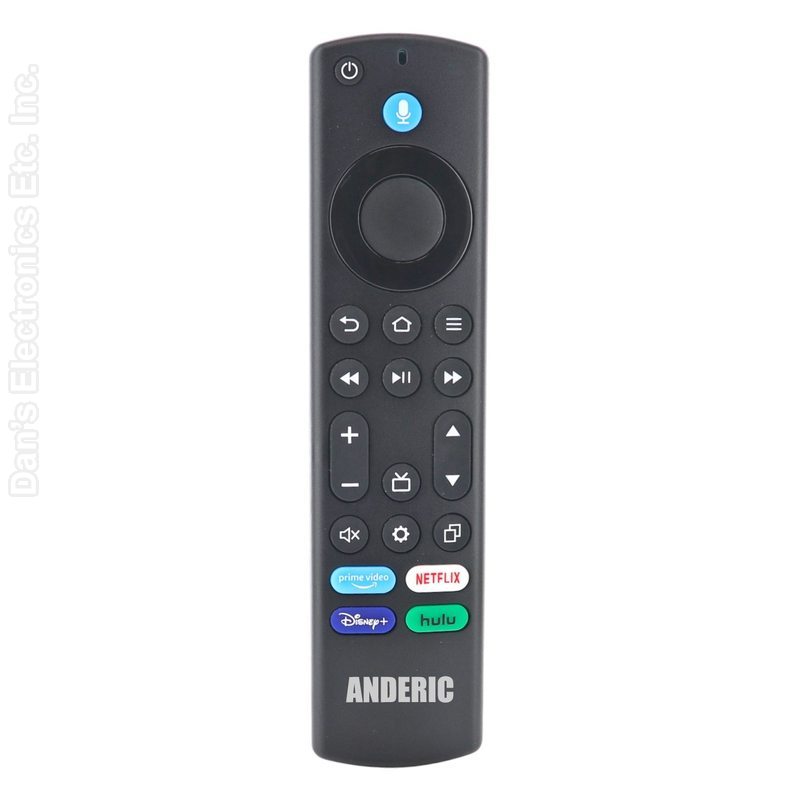
The Anderic RRF1G1 is a Fire TV voice remote that works in place of the old remote.
Specifications
- Shipped remote: Anderic RRF1G1
- Infrared (IR); point it at the device
- Batteries: 2 AAA (not included)
- Range: stay within about 10 feet (3 m) of the Fire TV device when pairing and troubleshooting
Good to Know
Setup / Pairing
Option 1: Pairing with a Fire TV smart TV
- Press HOME on your current Fire TV remote.
- Go to Settings ? Controllers & Bluetooth Devices ? Voice Remotes with Alexa ? Add New Remote.
- Press and hold the HOME button on the RRF1G1 for 10 seconds.
- When pairing is successful, begin using voice control. If voice control does not work, repeat the steps above.
Option 2: Pairing with a Fire TV Stick or Fire TV Cube
- Unplug the power from your Fire TV device.
- Wait 10 seconds, then reconnect the power.
- Do NOT press any buttons during startup.
- Wait about 1 minute for the pairing screen to appear.
- Press and hold the HOME button for 10 seconds. If voice control does not work, repeat the process.
Pairing additional remotes
- Go to Settings on your Fire TV.
- Select Controllers & Bluetooth Devices.
- Select Amazon Fire TV Remotes.
- Press and hold the HOME button for 10 seconds. If seven remotes are already paired, remove one before pairing a new remote.
Troubleshooting: Volume, Mute or Power do not work
- Replace the batteries (alkaline recommended; batteries are not included).
- Move within 10 feet (3 meters) of the Fire TV device.
- Restart your Fire TV (unplug and reconnect power).
- On the home screen, press and hold HOME for 10 seconds to re-pair.
Factory reset (before pairing to another device)
- Press and hold LEFT + MENU + BACK together for 12 seconds.
- Release all buttons.
- Press any button. A green light shows the reset was successful. If the light does not turn green, repeat the steps.
Troubleshooting
- If Volume, Mute or Power do not work, replace the batteries, move within 10 feet of the Fire TV, restart the Fire TV, then hold HOME for 10 seconds on the Home screen to re-pair.
- Before pairing to a different Fire TV, reset the remote: hold LEFT, MENU and BACK together for 12 seconds, then release.
What's in the Box
- 1 Anderic RRF1G1 remote
- Batteries not included
Compatible Models
- Fire TV Cube (1st Gen), Fire TV Cube (2nd Gen), Fire TV Cube (3rd Gen), Fire TV Stick (3rd Gen), Fire TV Stick Lite, Fire TV Stick 4K (1st Gen), Fire TV Stick 4K (2nd Gen), Fire TV Stick 4K Max (1st Gen) and others
- Also works with: Fire TV Stick 4K Max (1st Gen), Fire TV Stick 4K Max (2nd Gen), Insignia Fire TV Edition, TCL Fire TV Edition, Toshiba Fire TV Edition, Pioneer Fire TV Edition, Hisense Fire TV Edition, Omni Fire TV Edition, Panasonic Fire TV Edition
Before ordering, check the model or part number printed on your old remote (usually on the back or inside the battery compartment) and compare it to this list.
Guaranteed Compatible Universal
: Anderic RRU401, Use code:
2757 (
click here for programming instructions)