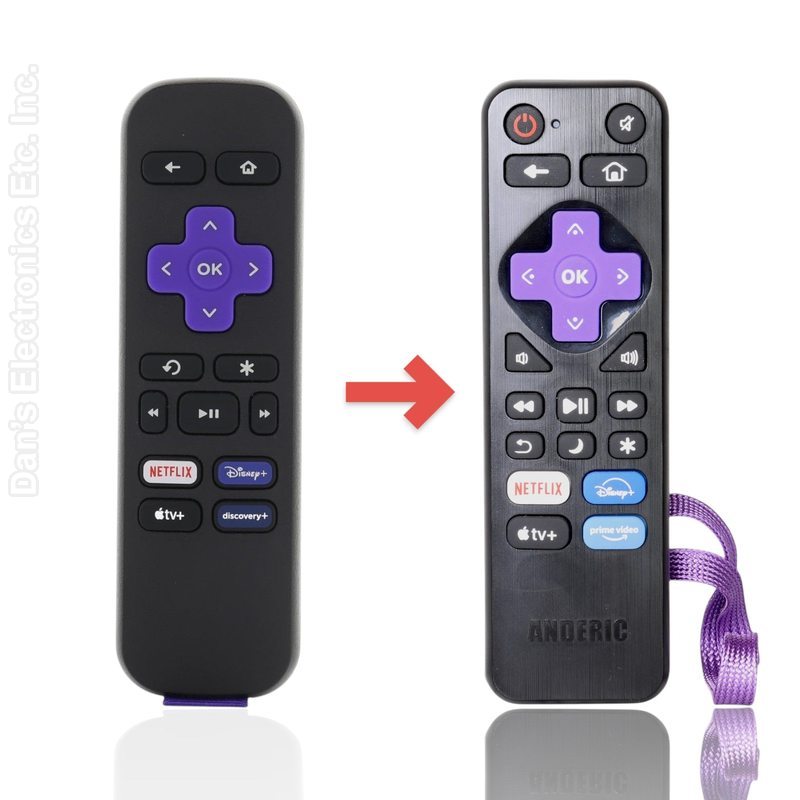
The Anderic RRST01 is a substitute for the Roku 3226001237 remote. It is a universal IR remote for Roku streaming players and Roku TVs, with learning.
Specifications
- Shipped remote: Anderic RRST01
- Infrared (IR); point it at the device
- Batteries: 2 AAA (not included)
Good to Know
- IR only: needs line of sight; no voice, no headphone jack, no RF or Bluetooth
- Does not work with Roku Streaming Sticks
- Roku TVs need to be programmed with the two-key code chart (Power/Volume/Mute are preset for LG and Vizio TVs)
- App shortcut keys may differ from the old remote (for example Prime Video or Sling)
Setup / Pairing
Before you start
- Uses 2 AAA batteries, which are not included. Insert them matching the polarity marks and replace the battery cover.
- IR remote: aim it at the TV or player with a clear line of sight.
Set the remote for your TV or player (brand code)
- Turn on your Roku TV or Roku player.
- Find your brand in the chart below.
- Press and hold OK and the key listed for your brand together for about 5 seconds, until the indicator light flashes three times. It is now programmed.
- Aim the remote at the TV or player and test Power, Volume and Home. If the first code does not work, try the codes for the other brands as well; one of them will most likely work.
| TV / player brand |
Press and hold for about 5 seconds |
| Roku Express streaming players |
Preset (factory setting). To return to it: OK & Rewind |
| Insignia (without Game key) |
OK & Fast Forward |
| Insignia (older, with Game key) |
OK & Back/Replay |
| Element, Haier, Hiro, Hisense, Hitachi, JVC, LG, Magnavox, ONN, Philips, Proscan, RCA, Sanyo, TCL, Westinghouse, Roku TV, Roku Ultra and Roku Premiere players, or any brand not listed |
OK & Sleep |
| Sharp, Hisense (older) |
OK & * |
| Sharp (older, with Game key) |
OK & Play/Pause |
| Hitachi (older) |
OK & Vol- |
Learn keys from your old remote
Every key can learn. You need the old remote, with working batteries.
- Press and hold Apple TV+ and OK together for about 5 seconds, until the indicator light brightens and stays on. Release both keys.
- Point the old remote at the RRST01 head-to-head, top edges lined up, about 1-2 inches apart, facing each other.
- On the RRST01, press and release the key you want to teach. The light flashes slowly.
- On the old remote, press and hold the matching key. The light on the RRST01 flashes 3 times to confirm, then stays on for the next key.
- Repeat steps 2-4 for each key you want to learn.
- Press Prime Video and OK together to save and exit. If you press nothing, it exits on its own after 20 seconds.
Delete all learned keys
- Press and hold Netflix and OK together for 3 seconds.
- The light flashes 3 times. All learned keys are deleted.
Reset to factory default
- Press and hold Disney+ and OK together for 3 seconds.
- The light flashes 3 times. The remote is back to its factory settings.
What's in the Box
- 1 Anderic RRST01 remote
- Batteries not included
Compatible Models
Before ordering, check the model or part number printed on your old remote (usually on the back or inside the battery compartment) and compare it to this list.
Guaranteed Compatible Universal
: Anderic RRU401, Use code:
2730, 5247 (
click here for programming instructions)
Dimensions: 2.00 x 6.00 x 1.00 (W x L x D, inches)