SETTING UP YOUR TV TERMINATOR
Step 1
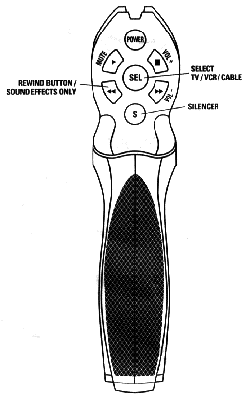
Make sure your TV is ON. Press SEL on the back of the
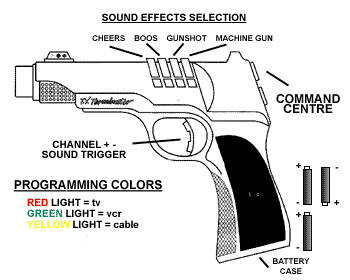
TV Terminator and you will see a light at the end of the nozzle. Press
through the three different lights which are RED,
GREEN, YELLOW
and stop at the red light.
Step 2
Hold down the SEL button until the RED
light starts flashing (approximately 5 seconds). Once the RED
light stops flashing, and the RED light is
solid, start shooting your TV with the channel up trigger at about
one shot per second until your TV turns off. (This could take
up to 80 shots)
Step 3
Press the SEL button once to lock in the code and your TV Terminator
is now programmed. To program the VCR and Cable modes repeat these steps
with the green or yellow
lights.
SOUND EFFECTS
To turn on the sound effects press the S button below the SEL
button. This S stands for silencer. The TV Terminator now has
sounds while you are changing channels.
If you want to have sound effects without changing channels press
the rewind button on the left of the S button. You now can shoot continuously
without changing channels.
Press the S button again and the sound effects will stop. |