
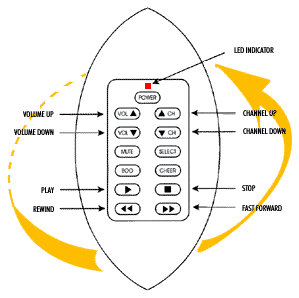
 PROGRAMMING COLORS
Green for VCR
Yellow for Cable & Satellite
Red for Television
- Slide back cover off and insert 3 triple "A" batteries.
2. Setting up your Football Sport Remote.
- Step 1
- Make sure your television set is ON. Press the SELECT button and you will see the LED light up. Push down on the Select button, and press through the three different lights which are GREEN for VCR, YELLOW for Cable/JLSatellite and RED for Television. Stop at the red light for television.
Step 2
- Hold down the SELECT button until the red light starts flashing (approximately 5 seconds). Once the red light stops flashing, and the red light is solid, start pressing the Channel Up button at about 1 press per second, until your television turns off. (This could take up to 60 presses).
Step 3
- Now that your television set is off, press the SELECT button once to lock in the code and your Football Sport Remote is now programmed. To program the VCR, Cable and Satellite repeat steps 1-3 using the corresponding colored lights.